


From UMT Model to C++ Code: A Door Controller in 30 Minutes
Teams developing embedded software based on state machines often face the same question: who writes the model, who writes the code, and how do the two stay in sync?
In this post I show UMTSM's answer to that question through a concrete example. We take a door controller from a .umt file all the way to production-ready C++ code — step by step.
The Problem: A Door That Operates in Automatic and Manual Mode
The system must satisfy the following requirements:
- In automatic mode, the door waits for a set period after opening and then closes on its own.
- In manual mode, the door moves only when the button is pressed.
- Switching between the two modes is possible at runtime.
- A mode change while the door is opening or closing does not interrupt the movement.
- After a power-off the system remembers its last state — when the device restarts, it continues from where it left off.
These are real product requirements. Keeping all five clean in a hand-written FSM can take weeks. If we were to express the system roughly as a UML diagram:

Expressed in UMTSM, the .umt file looks like this:
Step 1: Modelling the State Machine
type sm Engine;

sm Door
{
    persistent deep history -> ManualMode_Open;

    state ManualMode
    {
        Open:
            ButtonPressed -> Closing / engineRunACCW;

        Closing:
            entry / engineRunACCW;
            DoorClosed / engineStop -> Close;
            ButtonPressed / engineStop -> Opening;

        Close:
            ButtonPressed -> Opening;

        Opening:
            entry / engineRunCCW;
            DoorOpen / engineStop -> Open;
            ButtonPressed / engineStop -> Closing;

        Automatic -> AutomaticMode;
    }

    state AutomaticMode
    {
        Open:
            entry / resetWaitingTime;
            do    / wait;
            ButtonPressed / resetWaitingTime;
            -> Closing;

        Closing:
            entry / engineRunACCW;
            DoorClosed / engineStop -> Close;
            ButtonPressed / engineStop -> Opening;

        Close:
            ButtonPressed -> Opening;

        Opening:
            entry / engineRunCCW;
            DoorOpen / engineStop -> Open;

        Manual -> ManualMode;
    }
}
A few lines define:
- Two top-level composite states:
ManualModeandAutomaticMode - Four sub-states in each:
Open,Closing,Close,Opening - Timer-based closing in automatic mode via
do / waitwith a completion transition - Power-failure recovery via
persistent deep history - Dependency declaration on the Engine state machine via
type sm Engine
Step 2: Code Generation
UMTSM parses the model and converts it to a hierarchical internal representation (IR). CppGen generates the following files from this IR:
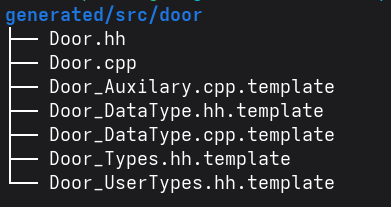
| File | Purpose |
|---|---|
| Door.hh | State machine class declaration |
| Door.cpp | State machine implementation |
| Door_DataType.hh | State machine data structure |
| Door_Types.hh | Derived type declarations |
| Door_Auxilary.cpp.template | Templates for user-written guard and action functions |
| Door_DataType.cpp.template | Template for data structure initialization and teardown |
| Door_UserTypes.hh.template | Template for user-defined external type declarations |
Generated files are not to be touched — they are overwritten on the next generation run. User-owned files live under src/door/ and are unaffected by generation.
Step 3: Implementing the Actions
Using the generated template as a guide, we create src/door/Door_Auxilary.cpp:
void Door::engineRunCCW([[maybe_unused]] Door_DataType const& input)
{
    instanceData.doorActionTimeStart = std::chrono::system_clock::now();
    instanceData.pEngine->trigger_runCCW();
}

void Door::engineRunACCW([[maybe_unused]] Door_DataType const& input)
{
    instanceData.doorActionTimeStart = std::chrono::system_clock::now();
    instanceData.pEngine->trigger_runACCW();
}

void Door::engineStop([[maybe_unused]] Door_DataType const& input)
{
    instanceData.pEngine->trigger_stop();
}

void Door::resetWaitingTime([[maybe_unused]] Door_DataType const& input)
{
    instanceData.waitUntil =
        std::chrono::system_clock::now() + DOOR_AUTO_CLOSE_DELAY;
}

void Door::wait([[maybe_unused]] Door_DataType const& input)
{
    std::this_thread::sleep_until(instanceData.waitUntil);
}
Actions are virtual methods — different hardware implementations can be provided without touching the SM skeleton. In simulation the motor is mimicked by sleeping in a thread; on real hardware a GPIO output is driven instead.
Step 4: Wiring the System Together
In src/main/main.cpp all state machines are instantiated and connected:
Door     door;
Engine   engine;
Button   button;
// ...

door.instanceData.pEngine   = &engine;
button.instanceData.pDoor   = &door;

engine.start();
door.start();      // persistent history is loaded here
button.start();
// ...
When door.start() is called, load_Deep_Main() reads the last state from persistent storage. On the very first boot it defaults to ManualMode::Open. On subsequent boots the last active state is restored.
Step 5: Running It
cmake -S . -B build/Release -DCMAKE_BUILD_TYPE=Release
cmake --build build/Release
./build/Release/src/main/door
The application opens with a full-screen ncurses interface:
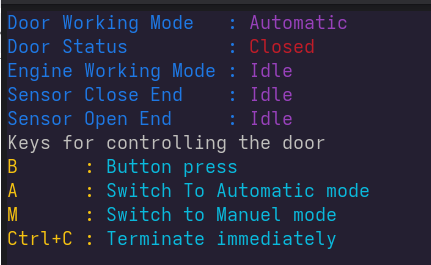
Pressing A switches the system to automatic mode. The door opens, the timer starts, and when the time expires the door begins closing. Pressing M during that time lets the door continue its current movement — the motor does not stop — but from that point on the rules of manual mode apply.
What Did We Achieve?
| Requirement | Approach |
|---|---|
| Automatic closing | do / wait + completion transition |
| Manual mode | Movement driven by button event |
| Mode switching | Manual / Automatic event, symmetric transitions |
| Mode switch during movement | No entry action on transition, motor keeps running |
| Recovery after power failure | persistent deep history + store_Deep_Main |
Total hand-written code: ~150 lines of action implementations and ~50 lines of main.cpp. Everything else was generated.
Conclusion
The essence of what UMTSM provides in this example is simple: deriving both the model and the code from the same source file. When the .umt file changes, the generated skeleton is updated and user implementations are preserved. The model and the code never lose synchronisation.
The complete example code is on GitHub: https://github.com/demiralp/umtsm-examples-cpp
For questions or projects related to UMTSM, feel free to get in touch.


